|
Tech Support
Internet Exchange Frequently Asked Questions
Internet Exchange Messaging Server
Sophos Anti-Virus Configuration
Sophos SAVI
Additional information on the Sophos SAVI
(bundled with the Sophos Anti-Virus for Windows NT) can be found on the Sophos web site. A free evaluation is also available from Sophos.
Configuration
Installation procedures:
- Install Sophos SWEEP for Window NT on the system that Internet Exchange Anti-Virus
plug-in is running on. Consult SWEEP installation manual for details.
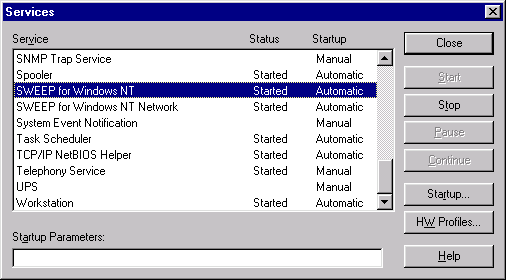
- After installation is completed, go to the "Services" icon in the Control
Panel (Start -> Settings -> Control Panel -> Services). Locate "SWEEP for
Windows NT" and "SWEEP for Windows NT Network"
- Change the startup type from Automatic to disabled. It is required NOT to run SWEEP for
Windows NT service with Internet Exchange. If SWEEP for Windows NT service is currently
running, stop it by clicking the STOP button
The
following are the Internet Exchange Anti-virus plug-in’s profile configurations
values:
- Program type: DLL
- Program path: C:\Program files\Sophos SWEEP for NT (or the location your Sophos is
installed.)
- Command line parameters: NOT REQUIRED
- No error codes: NOT REQUIRED
- Error codes: NOT REQUIRED
- Detected virus codes: NOT REQUIRED
|