|
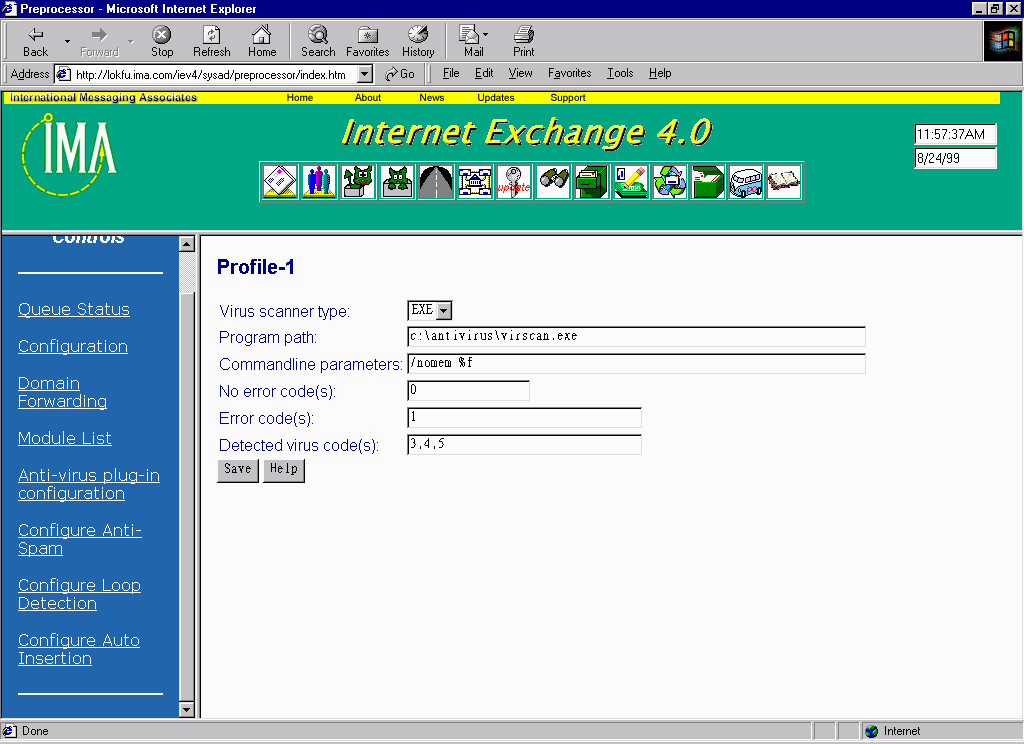
Tech Support Internet Exchange Frequently Asked Questions Internet Exchange Messaging Server To configure the various features of Anti-virus module. Go to the main Preprocessor Configuration screen and click on the Anti-Virus plug-in configuration link. The configuration screen for the Anti-virus module will appear. Now we can select any of the available anti-virus profile. By clicking on the show button we can view the profile or can create a new profile by clicking on the create button or we can edit the profile with the edit button or even delete the profile by using the delete button. Now, you can go ahead and either select any available anti virus profile and edit it by using the EDIT button, or you can create a new anti virus profile by using the NEW button. In our example, we assume that you have an anti-virus software package called "VIRUS-SCAN" installed on C:\Antivirus, which is a DOS command line application. On the profile configuration page, select EXE as the Virus scanner type. On the Program path entry, you will need to put the path and the name of the executable, which in this case is C:\Antivirus\virscan.exe. Now depending on the anti virus software you selected, you will need to put the proper command line parameters in the configuration. A special symbol "%f" is used for telling the Anti-virus plug-in to pass the temporary file name to the anti virus software you selected. On the profile configuration page, you need to put three sets of numbers that might be returned by the selected anti virus software. These three sets of number tell the Anti-virus plug-in whether the attachment is clean ( no virus infection ), suspicious ( error condition ) or is infected by a known virus. If there are more than 1 possible values for any of these categories, we use a comma to separate each of them. Or, you can use the symbols ">" (greater than), "<" (smaller than) or " – " (a range of) to define a number range. you might need to consult the anti virus manual for all the possible values returned by the software. The Internet Exchange 4.0 Anti-Virus plug-in also supports Sophos SAVI ( Sophos Anti-Virus Interface ), which is a Windows DLL interface to perform virus scanning. The major advantage of using SAVI is on performance boost. Generally speaking, SAVI is about 30 times faster than launching a DOS or WIN32 console based anti virus software. It is because SAVI can be loaded and stay in memory during system start up and thus, eliminate all the additional loading / cleanup time for launching a DOS or WIN32 console application on every attachment to be scanned. However, SAVI technology is only available on Windows NT. Installation and configuration details for Sophos and other supported 3rd party Anti-Virus packages can be found here. |